java
Data Types: 8 primitive + other non-primitive

बकबे सिल्फ़ड| Type | Size (bits) | Minimum | Maximum | Example |
|---|---|---|---|---|
| byte | 8 | -27 | 27– 1 | byte b = 100; |
| short | 16 | -215 | 215– 1 | short s = 30_000; |
| int | 32 | -231 | 231– 1 | int i = 100_000_000; |
| long | 64 | -263 | 263– 1 | long l = 100_000_000_000_000; |
| float | 32 | -2-149 | (2-2-23)·2127 | float f = 1.456f; |
| double | 64 | -2-1074 | (2-2-52)·21023 | double f = 1.456789012345678; |
| char | 16 | 0 | 216– 1 | char c = ‘c'; |
public class tmp {

    public static void main(String[] args) {

        int myValue = 10000;

        int myMinIntValue = Integer.MIN_VALUE;
        int myMaxIntValue = Integer.MAX_VALUE;
        System.out.println("Integer Minimum Value = " + myMinIntValue);
        System.out.println("Integer Maximum Value = " + myMaxIntValue);
        System.out.println("Busted MAX value = " + (myMaxIntValue + 1));
        System.out.println("Busted MIN value = " + (myMinIntValue - 1));

        int myMaxIntTest = 2_147_483_647;
    }
}
Integer Minimum Value = -2147483648
Integer Maximum Value = 2147483647
Busted MAX value = -2147483648
Busted MIN value = 2147483647
byte myMinByteValue = Byte.MIN_VALUE;
byte myMaxByteValue = Byte.MAX_VALUE;
System.out.println("Byte Minimum Value = " + myMinByteValue);
System.out.println("Byte Maximum Value = " + myMaxByteValue);
short myMinShortValue = Short.MIN_VALUE;
short myMaxShortValue = Short.MAX_VALUE;
System.out.println("Short Minimum Value = " + myMinShortValue);
System.out.println("Short Maximum Value = " + myMaxShortValue);
long myLongValue = 100;
long myMinLongValue = Long.MIN_VALUE;
long myMaxLongValue = Long.MAX_VALUE;
System.out.println("Long Minimum Value = " + myMinLongValue);
System.out.println("Long Maximum Value = " + myMaxLongValue);
long bigLongLiteralValue = 2_147_483_647_234L;
System.out.println(bigLongLiteralValue);
short bigShortLiteralValue = 32767;
Byte Minimum Value = -128
Byte Maximum Value = 127
Short Minimum Value = -32768
Short Maximum Value = 32767
Long Minimum Value = -9223372036854775808
Long Maximum Value = 9223372036854775807
2147483647234
Java Type Casting
byte byteValue = 10;
short shortValue = 20;
int intValue = 50;long longTotal = 50000L + 10L * (byteValue + shortValue + intValue);
//Don't need to type cast
System.out.println(longTotal);// need to type cast
short shortTotal = (short) (1000 + 10 *
(byteValue + shortValue + intValue));
float in java:
- The float covers a range from 1.40129846432481707e-45 to 3.40282346638528860e+38 (positive or negative).
- Its default value is 0.0f.
- Its default size is 4 byte.
- It can be used to save memory in large arrays of floating point numbers.
- It is not a good approach to use float for precise values, such as currency.
- float num1=5.5f; output => 5.5
- float num2=5f; =>5.0
- float num1=5; =>5.0
- float num1=581216732.323433f; => 5.812167E8
- float num2=7.83684987683688f; => 7.8368497
- //providing same value in scientific notation
- float num2=1.8732e3f; =>1873.2
- float num1=1.40129846432481707e-45f; =>1.4E-45
- float num2=3.40282346638528860e+38f; =>3.4028235E38
double in java
BigDecimal in java : imp
There are two ways to create String object:
- By string literal
- By new keyword
break the string in the form of characters:
- import java.util.Arrays;
- String str="javatpoint";
- char[] ch=str.toCharArray();
- System.out.println("String: "+str);
- System.out.println("char: "+Arrays.toString(ch));
Output:
String: javatpoint
char: [j, a, v, a, t, p, o, i, n, t]
is same as:
- String s="Sachin";
- s.concat(" Tendulkar");//concat() method appends the string at the end
- System.out.println(s);//will print Sachin because strings are immutable objects
Output:
Sachin
- String s="Sachin";
- s=s.concat(" Tendulkar");
- System.out.println(s);
Output:
Sachin Tendulkar
- boolean b1=true;
- boolean b2=false;
Why String class is Final in Java?
The reason behind the String class being final is because no one can override the methods of the String class. So that it can provide the same features to the new String objects as well as to the old ones.
String lastString = "10";
int myInt = 50;
lastString = lastString + myInt;
System.out.println("LastString is equal to " + lastString);
double doubleNumber = 120.47d;
lastString = lastString + doubleNumber;
System.out.println("LastString is equal to " + lastString);
LastString is equal to 1050
LastString is equal to 1050120.47
There are three ways to compare String in Java:
By Using equals() Method:s1.equals(s2); // returns true or false
By Using == Operator (dhyan dene ki jarurat andhere me teer mt chalana necche dekho):
- String s1="Sachin";
- String s2="Sachin";
- String s3=new String("Sachin");
- System.out.println(s1==s2);//true (because both refer to same instance)
- System.out.println(s1==s3);//false(because s3 refers to instance created in nonpool)
Output:
true
false
- s1 == s2 : The method returns 0.
- s1 > s2 : The method returns a positive value.
- s1 < s2 : The method returns a negative value.
- By + (String concatenation) operator:
2) by concat() method:
using StringBuilder class
- StringBuilder s1 = new StringBuilder("Hello"); //String 1
- StringBuilder s2 = new StringBuilder(" World"); //String 2
- StringBuilder s = s1.append(s2); //String 3 to store the result
- System.out.println(s.toString()); //Displays result Attention: s.toString() here
using format() method
- String s1 = new String("Hello"); //String 1
- String s2 = new String(" World"); //String 2
- String s = String.format("%s%s",s1,s2); //String 3 to store the result
- System.out.println(s.toString()); //Displays result Attention: s.toString() here
using String.join() method (Java Version 8+)
- String s1 = new String("Hello"); //String 1
- String s2 = new String(" World"); //String 2
- String s = String.join("",s1,s2); //String 3 to store the result
- System.out.println(s.toString()); //Displays result
using StringJoiner class (Java Version 8+)
- StringJoiner s = new StringJoiner(", "); //StringeJoiner object
- s.add("Hello"); //String 1
- s.add("World"); //String 2
- System.out.println(s.toString()); //Displays result
using Collectors.joining() method (Java (Java Version 8+)
- import java.util.*;
- import java.util.stream.Collectors;
- List<String> liststr = Arrays.asList("abc", "pqr", "xyz"); //List of String array
- String str = liststr.stream().collect(Collectors.joining(", ")); //performs joining operation
- System.out.println(str.toString()); //Displays result
Output:
abc, pqr, xyz
Substring in Java:
import java.util.*;
public class GFG {
    public static void main(String args[])
    {
        String str = "geekss@for@geekss";
        String[] arrOfStr = str.split("@");
        System.out.println(Arrays.toString(arrOfStr));
        for (String a : arrOfStr)
            System.out.println(a);
    }
}
[geekss, for, geekss]
geekss
for
geekss- String replaceString=s1.replace("Java","Kava");//replaces all occurrences of "Java" to "Kava"
- Convert String to int:
- int i=Integer.parseInt(s);
- Integer i=Integer.valueOf(s);
- Convert int to String:
- int i=200;
- String s=String.valueOf(i);
- String s=Integer.toString(i);
- String s=String.format("%d",i);
- Convert String to long:
- String s="9990449935";
- long l=Long.parseLong(s);
- Convert long to String:
- long i=9993939399L;
- String s=String.valueOf(i);
- String s=Long.toString(i);
- https://www.javatpoint.com/java-string-to-float
- https://www.javatpoint.com/java-float-to-string and so on.... dekh lo next krke
Exceptions in Java


- try
- {
- int data=50/0; //may throw exception
- }
- // handling the exception by using Exception class
- catch(Exception e)
- {
- System.out.println(e);
- }
- System.out.println("rest of the code"); or
- try{
- //code that may raise exception
- int data=100/0;
- }catch(ArithmeticException e){System.out.println(e);}
- //rest code of the program
- System.out.println("rest of the code...");
- }
Output:
Exception in thread main java.lang.ArithmeticException:/ by zero
rest of the code...
- int a=50/0;
- String s=null;
- System.out.println(s.length());
- String s="abc";
- int i=Integer.parseInt(s);
- int a[]=new int[5];
- a[10]=50;
Hierarchy of Collection Framework:

List Interface:
- List <data-type> list= new ArrayList();
- List <data-type> list2 = new LinkedList();
- List <data-type> list3 = new Vector();
- List <data-type> list4 = new Stack();
ArrayList: It uses a dynamic array
- ArrayList<String> list=new ArrayList<String>();//Creating arraylist
- list.add("Ravi");//Adding object in arraylist
- list.add("Vijay");
- list.add("Ravi");
- list.add("Ajay");
- //Traversing list through Iterator
- Iterator itr=list.iterator();
- while(itr.hasNext()){
- System.out.println(itr.next());
- }

jmks:
        // Converting int ya long to BigInteger
         BigInteger b = new BigInteger(String.valueOf(n));
BigInteger ke pass hi jadu hau hai Quick Prime Check krne ka:b.isProbablePrime(1)
next Prime in Java:
 BigInteger b = new BigInteger(String.valueOf(n));
long ans= Long.parseLong(b.nextProbablePrime().toString());
 System.out.println(ans);
            Scanner sc=new Scanner(System.in);  //System.in is a standard input stream
            String s= sc.nextLine();
str.length()
str.charAt(i)
Reverse String(or sentence) using inBuilt Function:
    Scanner sc=new Scanner(System.in);  //System.in is a standard input stream
    String s= sc.nextLine();
    StringBuilder ans = new StringBuilder();
// append a string into StringBuilder input1
    ans.append(s);
// reverse StringBuilder input1
   ans.reverse();
   System.out.println(ans);
    Scanner sc=new Scanner(System.in);  //System.in is a standard input stream
    String s= sc.nextLine();
    StringBuffer ans = new StringBuffer(s);
// To reverse the string
   ans.reverse();
   System.out.println(ans);
jkms: int digit_count=0;
// Find total digits in number
digit_count = (int) Math.log10(n) + 1;jkms:
Function to calculate x raised to the power y: (using inBuilt)int ans=(int)Math.pow(x, y);
https://www.javatpoint.com/how-to-print-ascii-value-in-java
jkms:
gcd using BigInteger
String s1=sc.nextLine();
String s2=sc.nextLine();
BigInteger a=new BigInteger(s1);
BigInteger b=new BigInteger(s2);
System.out.println(a.gcd(b));
˜”*°•.˜”*°• oops concept •°*”˜.•°*”˜

Object
Any entity that has state and behavior is known as an object. For example, a chair, pen, table, keyboard, bike, etc. It can be physical or logical.
An Object can be defined as an instance of a class. An object contains an address and takes up some space in memory.
- State : It is represented by attributes of an object. It also reflects the properties of an object.
- Behavior : It is represented by methods of an object. It also reflects the response of an object with other objects.
- Identity : It gives a unique name to an object and enables one object to interact with other objects.
Class
A class is a user defined blueprint or prototype from which objects are created. It represents the set of properties or methods that are common to all objects of one type. In general, class declarations can include these components, in order:
- Modifiers: A class can be public or has default access (Refer this for details).
- Class name: The name should begin with a initial letter (capitalized by convention).
- Superclass(if any): The name of the class’s parent (superclass), if any, preceded by the keyword extends. A class can only extend (subclass) one parent.
- Interfaces(if any): A comma-separated list of interfaces implemented by the class, if any, preceded by the keyword implements. A class can implement more than one interface.
- Body: The class body surrounded by braces, { }.
new keyword in Java
The new keyword is used to allocate memory at runtime. All objects get memory in Heap memory area.
3 Ways to initialize object(refer here)
There are 3 ways to initialize object in Java.
- By reference variable
- By method
- By constructor
Anonymous object
Anonymous simply means nameless. An object which has no reference is known as an anonymous object. It can be used at the time of object creation only.
If you have to use an object only once, an anonymous object is a good approach. For example:
Let's see the full example of an anonymous object in Java.
Output:
Factorial is 120
- A Java constructor cannot be abstract, static, final, and synchronized
class Base1{
    Base1(){
        System.out.println("I am a constructor");
    }
    Base1(int x){
        System.out.println("I am an overloaded constructor with value of x as: " + x);
    }
}

class Derived1 extends Base1{
    Derived1(){
        //super(0);
        System.out.println("I am a derived class constructor");
    }
    Derived1(int x, int y){
        super(x);
        System.out.println("I am an overloaded constructor of Derived with value of y as: " + y);
    }
}

class ChildOfDerived extends  Derived1{
    ChildOfDerived(){
        System.out.println("I am a child of derived constructor");
    }
    ChildOfDerived(int x, int y, int z){
        super(x, y);
        System.out.println("I am an overloaded constructor of Derived with value of z as: " + z);
    }
}
public class cwh_46_constructors_in_inheritance {
    public static void main(String[] args) {
        // Base1 b = new Base1();
        // Derived1 d = new Derived1();
        // Derived1 d = new Derived1(14, 9);
        // ChildOfDerived cd = new ChildOfDerived();
        ChildOfDerived cd = new ChildOfDerived(12, 13, 15);
    }
}
I am an overloaded constructor with value of x as: 12
I am an overloaded constructor of Derived with value of y as: 13
I am an overloaded constructor of Derived with value of z as: 15
Java Copy Constructor
There is no copy constructor in Java. However, we can copy the values from one object to another like copy constructor in C++.
There are many ways to copy the values of one object into another in Java. They are:
- By constructor
- By assigning the values of one object into another
- By clone() method of Object class
In this example, we are going to copy the values of one object into another using Java constructor.
Output:
111 Karan
111 Karan
Copying values without constructor
We can copy the values of one object into another by assigning the objects values to another object. In this case, there is no need to create the constructor.
Output:
111 Karan
111 Karan
Q) Does constructor return any value?
Yes, it is the current class instance (You cannot use return type yet it returns a value).
Inheritance in Java
Inheritance in Java is a mechanism in which one object acquires all the properties and behaviors of a parent object.
Inheritance represents the IS-A relationship which is also known as a parent-child relationship.
Terms:
Sub Class/Child Class:
Super Class/Parent Class:
Single Inheritance Example
- class Employee{
- float salary=40000;
- }
- class Programmer extends Employee{
- int bonus=10000;
- public static void main(String args[]){
- Programmer p=new Programmer();
- System.out.println("Programmer salary is:"+p.salary);
- System.out.println("Bonus of Programmer is:"+p.bonus);
- }
- }
Multilevel Inheritance Example
class Faculty
{
float total_sal=0, salary=30000;
}

class HRA extends Faculty
{
float hra=3000;
}

class DA extends HRA
{
float da=2000;
}

class Science extends DA
{
float bonous=2000;
public static void main(String args[])
{
Science obj=new Science();
obj.total_sal=obj.salary+obj.hra+obj.da+obj.bonous;
System.out.println("Total Salary is:"+obj.total_sal);
}
}
Output
Total Salary is: 37000.0
Why multiple inheritance is not supported in java?
The reason behind this is to prevent ambiguity.
Consider a case where class B extends class A and Class C and both class A and C have the same method display().
Now java compiler cannot decide, which display method it should inherit. To prevent such situation, multiple inheritances is not allowed in java.
Hierarchical Inheritance Example

Syntax of Hierarchical Inheritance in Java:
class Subclassname1 extends Superclassname
{
// variables and methods
}
class Subclassname2 extends Superclassname
{
// variables and methods
}
package P1;
class Employee{
float salary = 40000;
}
class PermanentEmp extends Employee{
double hike = 0.5;
}
class TemporaryEmp extends Employee{
double hike = 0.35;
}
public class HerInheritanceDemo
{
public static void main(String args[]){
PermanentEmp p = new PermanentEmp();
TemporaryEmp t = new TemporaryEmp();
// All objects of inherited classes can access the variable of class Employee
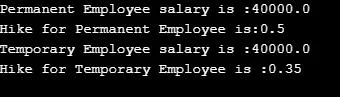
System.out.println("Permanent Employee salary is :" +p.salary);
System.out.println("Hike for Permanent Employee is:" +p.hike);
System.out.println("Temporary Employee salary is :" +t.salary);
System.out.println("Hike for Temporary Employee is :" +t.hike);
}
}
Output:
https://www.javatpoint.com/aggregation-in-java
class Phone{
    public void showTime(){
        System.out.println("Time is 8 am");
    }
    public void on(){
        System.out.println("Turning on Phone...");
    }
}

class SmartPhone extends Phone{
    public void music(){
        System.out.println("Playing music...");
    }
    public void on(){
        System.out.println("Turning on SmartPhone...");
    }
}
public class tmp {
    public static void main(String[] args) {
        // Phone obj = new Phone(); // Allowed
        // SmartPhone smobj = new SmartPhone(); // Allowed
        // obj.name();

        Phone obj = new SmartPhone(); // Yes it is allowed
        // SmartPhone obj2 = new Phone(); // Not allowed

        obj.showTime();
        obj.on();
        // obj.music(); Not Allowed


    }
}
Time is 8 am
Turning on SmartPhone...
Method Overloading in Java
If a class has multiple methods having same name but different in parameters, it is known as Method Overloading.
Different ways to overload the method
There are two ways to overload the method in java
- By changing number of arguments
- By changing the data type
In Java, Method Overloading is not possible by changing the return type of the method only.
- By changing number of arguments
- static int add(int a,int b){return a+b;}
- static int add(int a,int b,int c){return a+b+c;}
- By changing the data type
- static int add(int a, int b){return a+b;}
- static double add(double a, double b){return a+b;}
Why Method Overloading is not possible by changing the return type of method only?
In java, method overloading is not possible by changing the return type of the method only because of ambiguity. Let's see how ambiguity may occur:
Output:
Compile Time Error: method add(int,int) is already defined in class Adder
Can we overload java main() method?
Yes, by method overloading. You can have any number of main methods in a class by method overloading. But JVM calls main() method which receives string array as arguments only. Let's see the simple example:
Test it NowOutput:
main with String[]
Method Overriding in Java
If subclass (child class) has the same method as declared in the parent class, it is known as method overriding in Java.
Rules for Java Method Overriding
- The method must have the same name as in the parent class
- The method must have the same parameter as in the parent class.
- There must be an IS-A relationship (inheritance).
Can we override static method?
No, a static method cannot be overridden. It can be proved by runtime polymorphism, so we will learn it later.
Why can we not override static method?
It is because the static method is bound with class whereas instance method is bound with an object. Static belongs to the class area, and an instance belongs to the heap area.
Can we override java main method?
No, because the main is a static method.
Polymorphism in java
Polymorphism means "many forms", and it occurs when we have many classes that are related to each other by inheritance.
Real life example of polymorphism: A person at the same time can have different characteristic. Like a man at the same time is a father, a husband, an employee. So the same person posses different behavior in different situations. This is called polymorphism.
In Java polymorphism is mainly divided into two types:
- Compile time Polymorphism
- Runtime Polymorphism
1. Compile-time polymorphism: It is also known as static polymorphism. This type of polymorphism is achieved by function overloading or operator overloading. But Java doesn’t support the Operator Overloading.
Example: By using different types of arguments
// Java program for Method overloading
class MultiplyFun {
// Method with 2 parameter
static int Multiply(int a, int b)
{
return a * b;
}
// Method with the same name but 2 double parameter
static double Multiply(double a, double b)
{
return a * b;
}
}
class Main {
public static void main(String[] args)
{
System.out.println(MultiplyFun.Multiply(2, 4));
System.out.println(MultiplyFun.Multiply(5.5, 6.3));
}
}
Output:8
34.65
Example 2: By using different numbers of arguments// Java program for Method overloading
class MultiplyFun {
// Method with 2 parameter
static int Multiply(int a, int b)
{
return a * b;
}
// Method with the same name but 3 parameter
static int Multiply(int a, int b, int c)
{
return a * b * c;
}
}
class Main {
public static void main(String[] args)
{
System.out.println(MultiplyFun.Multiply(2, 4));
System.out.println(MultiplyFun.Multiply(2, 7, 3));
}
}
Output:8
42
2. Runtime polymorphism: It is also known as Dynamic Method Dispatch. It is a process in which a function call to the overridden method is resolved at Runtime. This type of polymorphism is achieved by Method Overriding.Limitations of Runtime Polymorphism
- One cannot override the private methods of a parent class.
- One cannot override Final methods.
- One cannot override static methods.
Runtime polymorphism with Hierarchical inheritanceclass Bike
{
int topSpeedLimit()
{
return 0;
}
}
Class Honda extends Bike
{
int topSpeedLimit()
{
return 150;
}
}
class Yamaha extends Bike
{
int topSpeedLimit()
{
return 180;
}
}
Class Tvs extends Bike
{
int topSpeedLimit()
{
return 200;
}
}
class Test
{
public static void main(String args[])
{
Bike b1 = new Honda();
Bike b2 = new Yamaha();
Bike b3 = new Tvs();
System.out.println("Top speed of Honda:" + b1.topSpeedLimit());
System.out.println("Top speed of Yamaha:" + b2.topSpeedLimit());
System.out.println("Top speed of Tvs:" + b3.topSpeedLimit());
}
}
Output Top speed of Honda:150Top speed of Yamaha:180Top speed of Tvs:200
Runtime Polymorphism with multilevel inheritance
Let's see a simple example.class Electronics {
void
function() {
System.out.println("Made for various purpose");
}
}
class Phone extends Electronics {
void
function() {
System.out.println("Display,Voice");
}
}
class Computer extends Phone {
void
function() {
System.out.println("Calculation,Internetworking");
}
public static void main(String args[])
{
Electronics e1 = new Electronics();
Electronics e2 = new Phone();
Electronics e3 = new Computer();
e1.function();
e2.function();
e3.function();
}
}
Output Made for various purposes.Display,VoiceCalculation,Internetworking
Abstraction in JavaAbstraction is a process of hiding the implementation details and showing only functionality to the user.Another way, it shows only essential things to the user and hides the internal details, for example, sending SMS where you type the text and send the message. You don't know the internal processing about the message delivery.Ways to achieve Abstraction
There are two ways to achieve abstraction in java
- Abstract class (0 to 100%)
- Interface (100%)
Abstract class in Java
A class which is declared with the abstract keyword is known as an abstract class in Java
. It can have abstract and non-abstract methods (method with the body).Points to Remember
- An abstract class must be declared with an abstract keyword.
- It can have abstract and non-abstract methods.
- It cannot be instantiated.
- It can have constructorsand static methods also.
- It can have final methods which will force the subclass not to change the body of the method.
Abstract Method in Java
A method which is declared as abstract and does not have implementation is known as an abstract method.
Example of Abstract class that has an abstract method
In this example, Bike is an abstract class that contains only one abstract method run. Its implementation is provided by the Honda class.
Rule: If there is an abstract method in a class, that class must be abstract.
Test it NowRate of Interest is: 7 %
Rate of Interest is: 8 %
- //Example of an abstract class that has abstract and non-abstract methods
- abstract class Bike{
- Bike(){System.out.println("bike is created");}
- abstract void run();
- void changeGear(){System.out.println("gear changed");}
- }
- //Creating a Child class which inherits Abstract class
- class Honda extends Bike{
- void run(){System.out.println("running safely..");}
- }
- //Creating a Test class which calls abstract and non-abstract methods
- class TestAbstraction2{
- public static void main(String args[]){
- Bike obj = new Honda();
- obj.run();
- obj.changeGear();
- }
- }
abstract:
abstract class Parent2{
    public Parent2(){
        System.out.println("Mai base2 ka constructor hoon");
    }
    public void sayHello(){
        System.out.println("Hello");
    }
    abstract public void greet();
    abstract public void greet2();
}

class Child2 extends Parent2{
    @Override
    public void greet(){
        System.out.println("Good morning");
    }
    @Override
    public void greet2(){
        System.out.println("Good afternoon");
    }
}

abstract class Child3 extends Parent2{
    public void th(){
        System.out.println("I am good");
    }
}
public class tmp {
    public static void main(String[] args) {
        //Parent2 p = new Parent2(); -- error
        Child2 c = new Child2();
        //Child3 c3 = new Child3(); -- error
    }
}
Mai base2 ka constructor hoonInterface in Java
An interface in Java is a blueprint of a class. It has static constants and abstract methods.
Since Java 8, we can have default and static methods in an interface.
Since Java 9, we can have private methods in an interface.
Why use Java interface?
There are mainly three reasons to use interface. They are given below.
- It is used to achieve abstraction.
- By interface, we can support the functionality of multiple inheritance.
- It can be used to achieve loose coupling.
interface Bicycle{
    int a = 45;
    void applyBrake(int decrement);
    void speedUp(int increment);
}

interface HornBicycle{
    int x = 45;
    void blowHornK3g();
    void blowHornmhn();
}

class AvonCycle implements Bicycle, HornBicycle{
    //public int x = 5;
    void blowHorn(){
        System.out.println("Pee Pee Poo Poo");
    }
    public void applyBrake(int decrement){
        System.out.println("Applying Brake");
    }
    public void speedUp(int increment){
        System.out.println("Applying SpeedUP");
    }
    public void blowHornK3g(){
        System.out.println("Kabhi khushi kabhi gum pee pee pee pee");
    }
    public void blowHornmhn(){
        System.out.println("Main hoon naa po po po po");
    }
}
public class tmp {
    public static void main(String[] args) {
        AvonCycle cycleHarry = new AvonCycle();
        cycleHarry.applyBrake(1);
        // You can create properties in Interfaces
        System.out.println(cycleHarry.a);
        System.out.println(cycleHarry.x);

        // You cannot modify the properties in Interfaces as they are final
        // cycleHarry.a = 454;
        //System.out.println(cycleHarry.a);

        cycleHarry.blowHornK3g();
        cycleHarry.blowHornmhn();
    }
}
Applying Brake
45
45
Kabhi khushi kabhi gum pee pee pee pee
Main hoon naa po po po po
Java 8 Static Method in Interface
Since Java 8, we can have static method in interface. Let's see an example:
File: TestInterfaceStatic.java
Output:
drawing rectangle
| Abstract class | Interface |
| 1. It can contain abstract and non-abstract method | It can only contain abstract methods. We do not need to use the "abstract" keyword in interface methods because the interface is implicitly abstract. |
| 2. abstract keyword is used to declare an abstract class. | interface keyword is used to declare an interface. |
| 3. A sub-class extends the abstract class by using the "extends" keyword. | The "implements" keyword is used to implement an interface. |
| 4. A abstract class in Java can have class members like private, protected, etc. | Members of a Java interface are public by default. |
| 5. Abstract class doesn't support multiple inheritance. | Multiple inheritance is achieved in Java by using the interface. |
Interpreter Vs Compliler :
The interpreter translates one statement at a time into machine code. On the other hand, the compiler scans the entire program and translates the whole of it into machine code
Interpreter :
- one statement at a time
- An interpreter is needed every time
- Partial execution if an error occurs in the program.
- Easy for programmers.
Compiler :
- Entire program at a time
- Once compiled, it is not needed
- No execution if an error occurs
- Usually not as easy as interpreted once
Encapsulation in Java
To achieve encapsulation in Java −
Declare the variables of a class as private.
Provide public setter and getter methods to modify and view the variables values.
Example
Following is an example that demonstrates how to achieve Encapsulation in Java −
/* File name : EncapTest.java */
public class EncapTest {
   private String name;
   private String idNum;
   private int age;

   public int getAge() {
      return age;
   }

   public String getName() {
      return name;
   }

   public String getIdNum() {
      return idNum;
   }

   public void setAge( int newAge) {
      age = newAge;
   }

   public void setName(String newName) {
      name = newName;
   }

   public void setIdNum( String newId) {
      idNum = newId;
   }
}
The variables of the EncapTest class can be accessed using the following program −
/* File name : RunEncap.java */
public class RunEncap {

   public static void main(String args[]) {
      EncapTest encap = new EncapTest();
      encap.setName("James");
      encap.setAge(20);
      encap.setIdNum("12343ms");

      System.out.print("Name : " + encap.getName() + " Age : " + encap.getAge());
   }
}
This will produce the following result −
Output
Name : James Age : 20
Benefits of Encapsulation
The fields of a class can be made read-only or write-only.
A class can have total control over what is stored in its fields.


Comments
Post a Comment