c++ oops
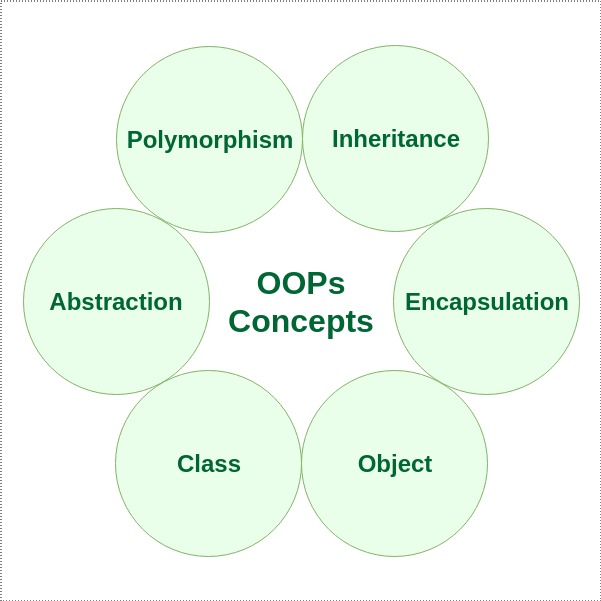
class: It is a user-defined data type, which holds its own data members and member functions, which can be accessed and used by creating an instance of that class. A class is like a blueprint for an object.
object: An Object is an instance of a Class. When a class is defined, no memory is allocated but when it is instantiated (i.e. an object is created) memory is allocated.
Member Functions in Classes
There are 2 ways to define a member function:
- Inside class definition
- Outside class definition
To define a member function outside the class definition we have to use the scope resolution :: operator along with class name and function name.
C++ Constructor:
The constructor parameter list enclosed in the square brackets is optional and may contain zero or more parameters.
There can be two types of constructors in C++.
- Default constructor
- Parameterized constructo
C++ Default Constructor
A constructor which has no argument is known as default constructor. It is invoked at the time of creating object.
- This compiler generates a default constructor which is invoked automatically whenever any object of the class is created but doesn’t perform any initialization. However, if you define a default constructor explicitly, the compiler no longer generates a default constructor for you.
C++ Parameterized Constructor
A constructor which has parameters is called parameterized constructor. It is used to provide different values to distinct objects.
- Constructors that can take arguments are known as parameterized constructors.
The syntax for declaring parameterized construct outside the class:
CONSTRUCTOR OVERLOADING
output:
x = 0 and y = 0
x = 10 and y = 10
x = 10 and y = 20
initialize Array of objects with parameterized constructors in C++
C++ Copy Constructor
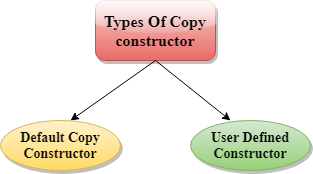
Syntax Of User-defined Copy Constructor:
- Class_name(const class_name &old_object);
In the above case, copy constructor can be called in the following ways:
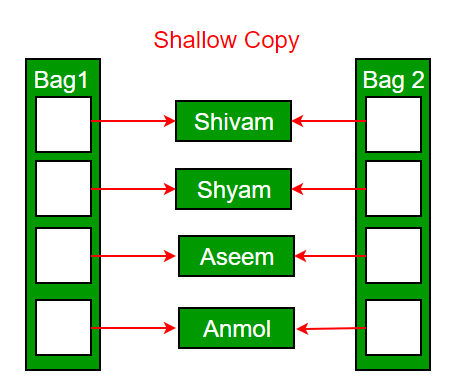
The default constructor does only shallow copy.
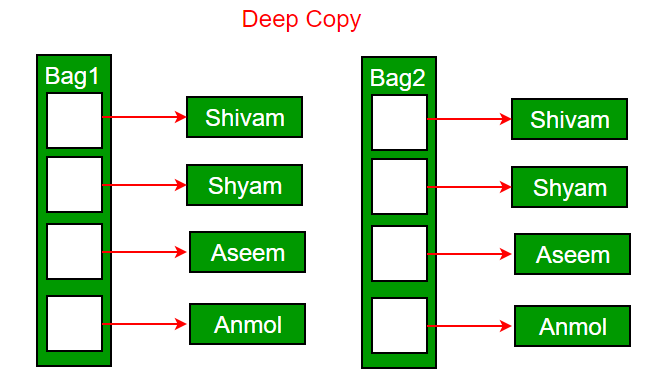
Deep copy is possible only with user defined copy constructor. In user defined copy constructor, we make sure that pointers (or references) of copied object point to new memory locations.
Differences b/w Copy constructor and Assignment operator(=)
| Copy Constructor | Assignment Operator |
|---|---|
| It is an overloaded constructor. | It is a bitwise operator. |
| It initializes the new object with the existing object. | It assigns the value of one object to another object. |
| Syntax of copy constructor: Class_name(const class_name &object_name) { // body of the constructor. } | Syntax of Assignment operator: Class_name a,b; b = a; |
| The assignment operator is invoked when we assign the existing object to a new object. |
| Both the existing object and new object shares the different memory locations. | Both the existing object and new object shares the same memory location. |
| If a programmer does not define the copy constructor, the compiler will automatically generate the implicit default copy constructor. | If we do not overload the "=" operator, the bitwise copy will occur. |
Destructors in C++
Syntax:
~constructor-name();
Properties of Destructor:
- Destructor function is automatically invoked when the objects are destroyed.
- It cannot be declared static or const.
- The destructor does not have arguments.
- It has no return type not even void.
- An object of a class with a Destructor cannot become a member of the union.
- A destructor should be declared in the public section of the class.
- The programmer cannot access the address of destructor.
Can there be more than one destructor in a class?
No, there can only one destructor in a class with classname preceded by ~, no parameters and no return type.
If we do not write our own destructor in class, compiler creates a default destructor for us
Static Keyword in C++
Static Members of Class : Class objects and Functions in a class
Output:
1 2
Static variables in a class: the static variables in a class are shared by the objects. There can not be multiple copies of same static variables for different objects. Also because of this reason static variables can not be initialized using constructors.
class X{public:static int i;X(){// construtor};};int X::i=1;int main(){X obj;cout << obj.i; // prints value of i => output: 1}
Once the definition for static data member is made, user cannot redefine it. Though, arithmetic operations can be performed on it.
Static Member Functions
These functions cannot access ordinary data members and member functions, but only static data members and static member functions.
Output:
Inside Constructor
Inside Destructor
End of main
class GfG{int i = 0;public:GfG(){i = 0;cout << "Inside Constructor\n";}~GfG(){cout << "Inside Destructor\n";}};int main(){int x = 0;if (x==0){static GfG obj;}cout << "End of main\n";}
Output:
Inside Constructor
End of main
Inside Destructor
You can clearly see the change in output. Now the destructor is invoked after the end of main. This happened because the scope of static object is through out the life time of program.
| Structure | Class |
|---|---|
| If access specifier is not declared explicitly, then by default access specifier will be public. | If access specifier is not declared explicitly, then by default access specifier will be private. |
| Syntax of Structure: struct structure_name { // body of the structure. } | Syntax of Class: class class_name { // body of the class. } |
| The instance of the structure is known as "Structure variable". | The instance of the class is known as "Object of the class". |
Friend Class A friend class can access private and protected members of other class in which it is declared as friend. It is sometimes useful to allow a particular class to access private members of other class.
Syntax of friend class:
class S; //forward declaration

class P{
  // Other Declarations
  friend class S;
};

class S{
  // Declarations
};
class S is a friend of class P. As a result class S can access the private data members of class P.
A forward declaration informs the compiler about an entity’s existence before the entity is explicitly defined.
Note: Class friendship is neither inherited nor mutual unless we make it so. This means that because class S is a friend of class P, it will be a friend of the sub-classes of class P.
// forward declaration
class ClassY;

class ClassX {
  int digit1;

  // friend class declaration
  friend class ClassY;

  public:
      // constructor to initialize num1 to 10
      ClassX() : digit1(10) {}
};

class ClassY {
    int digit2;

    public:
        // constructor to initialize num2 to 5
        ClassY() : digit2(5) {}

    // member function to multiply num1
    // from ClassX with num2 from ClassY
    int multiply() {
        ClassX m;
        return m.digit1 * digit2;
    }
};

int main() {
    ClassY n;
    cout << "Multiplication: " << n.multiply();
    return 0;
}
The output will be: Multiplication: 50
Friendship is not mutual. If class A is a friend of B, then B doesn’t become a friend of A automatically.
Friend Function:
A friend function does not fall within the scope of the class for which it was declared as a friend. Hence, functionality is not limited to one class.
The friend function can be a member of another class or a function that is outside the scope of the class.
A friend function can be declared in the private or public part of a class without changing its meaning.
Friend functions are not called using objects of the class because they are not within the class’s scope.
Without the help of any object, the friend function can be invoked like a normal member function.
Friend functions can use objects of the class as arguments.
A friend function cannot explicitly access member names directly. Every member name has to use the object’s name and dot operator
.. For example,Doctor.paywherepayis the object name.
// Program to illustrate friend function

class integer
{
  int a, b;
  public:
    void set_value()
    {
    a=50;
    b=30;
    }
  friend int mean(integer s);  //declaration of friend function
};

int mean(integer s)
{
  return int(s.a+s.b)/2.0; //friend function definition
}
int main()
{
  integer c;
  c.set_value();
  cout<< "Mean value:" <<mean(c);
  return 0;
}
The output of our program will be: Mean value: 40friend keyword, member functions of one class can also be made friend functions of another class by defining the function using the scope resolution operator as shown belowclass className1{
// Other Declarations
int functionName1(); // member function of className1
};
class className2
{
// Other Declarations
friend int className1::functionName();//The functionName1() is a friend of className2
};
Inheritance in C++
| Access | public | protected | private |
|---|---|---|---|
| Same class | yes | yes | yes |
| Derived classes | yes | yes | no |
| Outside classes | yes | no | no |
A derived class inherits all base class methods with the following exceptions −
- Constructors, destructors and copy constructors of the base class.
- Overloaded operators of the base class.
- The friend functions of the base class.

Public Inheritance − When deriving a class from a public base class, public members of the base class become public members of the derived class and protected members of the base class become protected members of the derived class. A base class's private members are never accessible directly from a derived class, but can be accessed through calls to the public and protected members of the base class.
Protected Inheritance − When deriving from a protected base class, public and protected members of the base class become protected members of the derived class.
Private Inheritance − When deriving from a private base class, public and protected members of the base class become private members of the derived class.
- Single inheritance
- Multiple inheritance
- Hierarchical inheritance
- Multilevel inheritance
- Hybrid inheritance
- Single inheritance
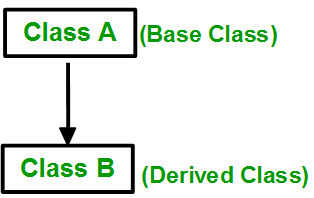 Syntax:
 class subclass_name : access_mode base_class { //body of subclass };
- Multiple inheritanceSyntax:
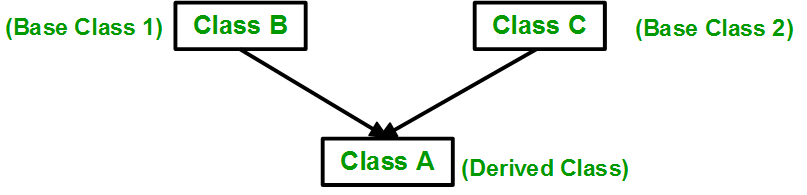
class subclass_name : access_mode base_class1, access_mode base_class2, ....
{
  //body of subclass
};
This is a Vehicle
This is a 4 wheeler Vehicle
class A{public:A() { cout << "A's constructor called" << endl; }};class B{public:B() { cout << "B's constructor called" << endl; }};class C: public B, public A // Note the order{public:C() { cout << "C's constructor called" << endl; }};int main(){C c;return 0;}
Output:
B's constructor called
A's constructor called
C's constructor called
https://www.geeksforgeeks.org/multiple-inheritance-in-c/
The destructors are called in reverse order of constructors.
// Base class Shape
class Shape {
   public:
      void setWidth(int w) {
         width = w;
      }
      void setHeight(int h) {
         height = h;
      }

   protected:
      int width;
      int height;
};

// Base class PaintCost
class PaintCost {
   public:
      int getCost(int area) {
         return area * 70;
      }
};

// Derived class
class Rectangle: public Shape, public PaintCost {
   public:
      int getArea() {
         return (width * height);
      }
};

int main(void) {
   Rectangle Rect;
   int area;

   Rect.setWidth(5);
   Rect.setHeight(7);

   area = Rect.getArea();

   // Print the area of the object.
   cout << "Total area: " << Rect.getArea() << endl;

   // Print the total cost of painting
   cout << "Total paint cost: $" << Rect.getCost(area) << endl;

   return 0;
}
- Hierarchical inheritance
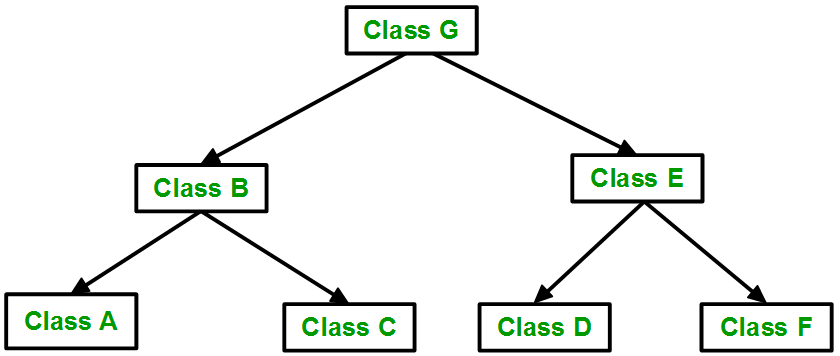
- Multilevel inheritance
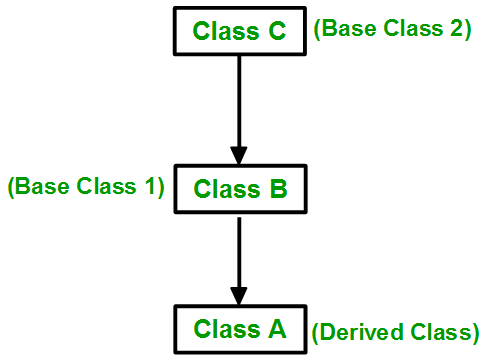
- Hybrid (virtual) inheritance Hybrid Inheritance is implemented by combining more than one type of inheritance. For example: Combining Hierarchical inheritance and Multiple Inheritance.
C++ Aggregation (HAS-A Relationship)
- class Address {
- public:
- string addressLine, city, state;
- Address(string addressLine, string city, string state)
- {
- this->addressLine = addressLine;
- this->city = city;
- this->state = state;
- }
- };
- class Employee
- {
- private:
- Address* address; //Employee HAS-A Address
- public:
- int id;
- string name;
- Employee(int id, string name, Address* address)
- {
- this->id = id;
- this->name = name;
- this->address = address;
- }
- void display()
- {
- cout<<id <<" "<<name<< " "<<
- address->addressLine<< " "<< address->city<< " "<<address->state<<endl;
- }
- };
- int main(void) {
- Address a1= Address("C-146, Sec-15","Noida","UP");
- Employee e1 = Employee(101,"Nakul",&a1);
- e1.display();
- return 0;
- }
Polymorphism in C++
- The word polymorphism means having many forms.
- Let's consider a real-life example of polymorphism. A lady behaves like a teacher in a classroom, mother or daughter in a home and customer in a market. Here, a single person is behaving differently according to the situations.
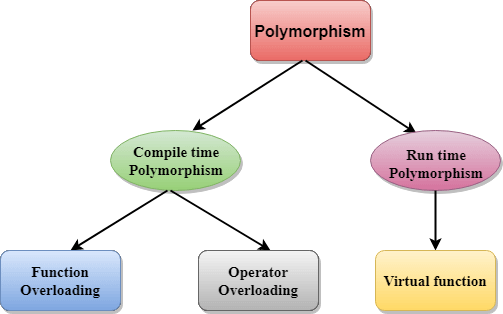
Compile time polymorphism: This type of polymorphism is achieved by function overloading or operator overloading.
Function Overloading: Functions can be overloaded by change in number of arguments or/and change in type of arguments.
The result of the addition of two objects is: Welcomeback
2. Runtime Polymorphism:It is achieved by method overriding which is also known as dynamic binding or late binding.
I. Function overriding:
- class Animal {
- public:
- void eat(){
- cout<<"Eating...";
- }
- };
- class Dog: public Animal
- {
- public:
- void eat()
- { cout<<"Eating bread...";
- }
- };
- int main(void) {
- Dog d = Dog();
- d.eat();
- return 0;
- }
Pointers to Derived Classes in C++ | C++ Tutorials for Beginners #55
Code file .\tut55.cpp as described in the video
Virtual Functions in C++ | C++ Tutorials for Beginners #56

class Shape {
   protected:
      int width, height;

   public:
      Shape( int a = 0, int b = 0){
         width = a;
         height = b;
      }
      int area() {
         cout << "Parent class area :" <<endl;
         return 0;
      }
};
class Rectangle: public Shape {
   public:
      Rectangle( int a = 0, int b = 0):Shape(a, b) { }

      int area () {
         cout << "Rectangle class area :" <<endl;
         return (width * height);
      }
};

class Triangle: public Shape {
   public:
      Triangle( int a = 0, int b = 0):Shape(a, b) { }

      int area () {
         cout << "Triangle class area :" <<endl;
         return (width * height / 2);
      }
};

// Main function for the program
int main() {
   Shape *shape;
   Rectangle rec(10,7);
   Triangle  tri(10,5);

   // store the address of Rectangle
   shape = &rec;

   // call rectangle area.
   shape->area();

   // store the address of Triangle
   shape = &tri;

   // call triangle area.
   shape->area();

   return 0;
}
When the above code is compiled and executed, it produces the following result −
Parent class area :
Parent class area :
The reason for the incorrect output is that the call of the function area() is being set once by the compiler as the version defined in the base class. This is called static resolution of the function call, or static linkage - the function call is fixed before the program is executed. This is also sometimes called early binding because the area() function is set during the compilation of the program.
After using virtual function:
class Shape {
   protected:
      int width, height;

   public:
      Shape( int a = 0, int b = 0) {
         width = a;
         height = b;
      }
      virtual int area() {
         cout << "Parent class area :" <<endl;
         return 0;
      }
};
After this slight modification, when the previous example code is compiled and executed, it produces the following result −
Rectangle class area
Triangle class area
This time, the compiler looks at the contents of the pointer instead of it's type. Hence, since addresses of objects of tri and rec classes are stored in *shape the respective area() function is called.
This sort of operation is referred to as dynamic linkage, or late binding.
Pure Virtual Functions and Abstract Classes

For example the following program works fine.
Output:
In Derived
3) If we do not override the pure virtual function in derived class, then derived class also becomes abstract class. class Base{public:virtual void show() = 0;};class Derived : public Base { };int main(void){Derived d;return 0;}
Compiler Error: cannot declare variable 'd' to be of abstract type
'Derived'  because the following virtual functions are pure within
'Derived': virtual void Base::show()
4) An abstract class can have constructors. lekin abstract class ka object to bnta nhi to constructor call kaise hoga, hoga bhai hoga constructor call , neeche code dekho// An abstract class with constructorclass Base{protected:int x;public:virtual void fun() = 0;Base(int i) {x = i;cout<<"Constructor of base called\n";}};class Derived: public Base{int y;public:Derived(int i, int j):Base(i) { y = j; }void fun() { cout << "x = " << x << ", y = " << y<<'\n'; }};int main(void){Derived d(4, 5);d.fun();//object creation using pointer of base classBase *ptr=new Derived(6,7);ptr->fun();return 0;}
output:
Constructor of base called
x = 4, y = 5
Constructor of base called
x = 6, y = 7
C++ Encapsulation
Encapsulation is one of the key features of object-oriented programming. It involves the bundling of data members and functions inside a single class.
Bundling similar data members and functions inside a class together also helps in data hiding.

In general, encapsulation is a process of wrapping similar code in one place.
Types Of Encapsulation
There are three types of encapsulations:
Member Variable Encapsulation
In this type of encapsulation, all the data members are declared as private.
Function Encapsulation
In this type of encapsulation, some of the member functions are declared as private. The constructor is public.
Class Encapsulation
In this type of encapsulation, all a class is declared as private. This is mostly done during nested classes.
In C++ encapsulation can be implemented using Class and access modifiers
The meaning of Encapsulation, is to make sure that "sensitive" data is hidden from users. To achieve this, you must declare class variables/attributes as private (cannot be accessed from outside the class). If you want others to read or modify the value of a private member, you can provide public get and set methods.
Access Private Members
To access a private attribute, use public "get" and "set" methods:
output: 50000
references:
geeksforgeeks
https://www.section.io/engineering-education/introduction-to-friend-functions-in-c++/
------------------------------------------------------

Comments
Post a Comment